Local-first. Deep analytics. Norway-ready.
Your portfolio, faster and clearer.
A desktop portfolio tracker for investors who want local control, rich performance views, and ownership-weighted fundamentals in one place. Import from major Nordic brokers, benchmark your past decisions, and connect optional Norway tax and Fiken workflows.
- Local-first
- Privacy mode
- Benchmark alpha
- FIFO taxes (NO)
- Broker imports
- Rich visualizations
- Fiken automation
- Norway-ready
- English + Norsk
Imports and brokers
Bring trades, dividends, and fees in from CSV or Excel with a guided wizard, or connect live broker integrations where available.
- Supported export formats today include Nordnet (Norway), Saxo (standard and extended), Interactive Brokers Activity Statement, and Nordea. Coverage for unusual export variants can be partial; more brokers are on the roadmap.
- Auto-detects broker and format from headers, then maps fields, validates rows, previews, and confirms.
- Pair mergers, spin-offs, and exchange legs during import so corporate actions stay consistent.
- Optional Nordnet API sync and Saxo OAuth sync for positions and trades beyond file uploads.
Performance and benchmark
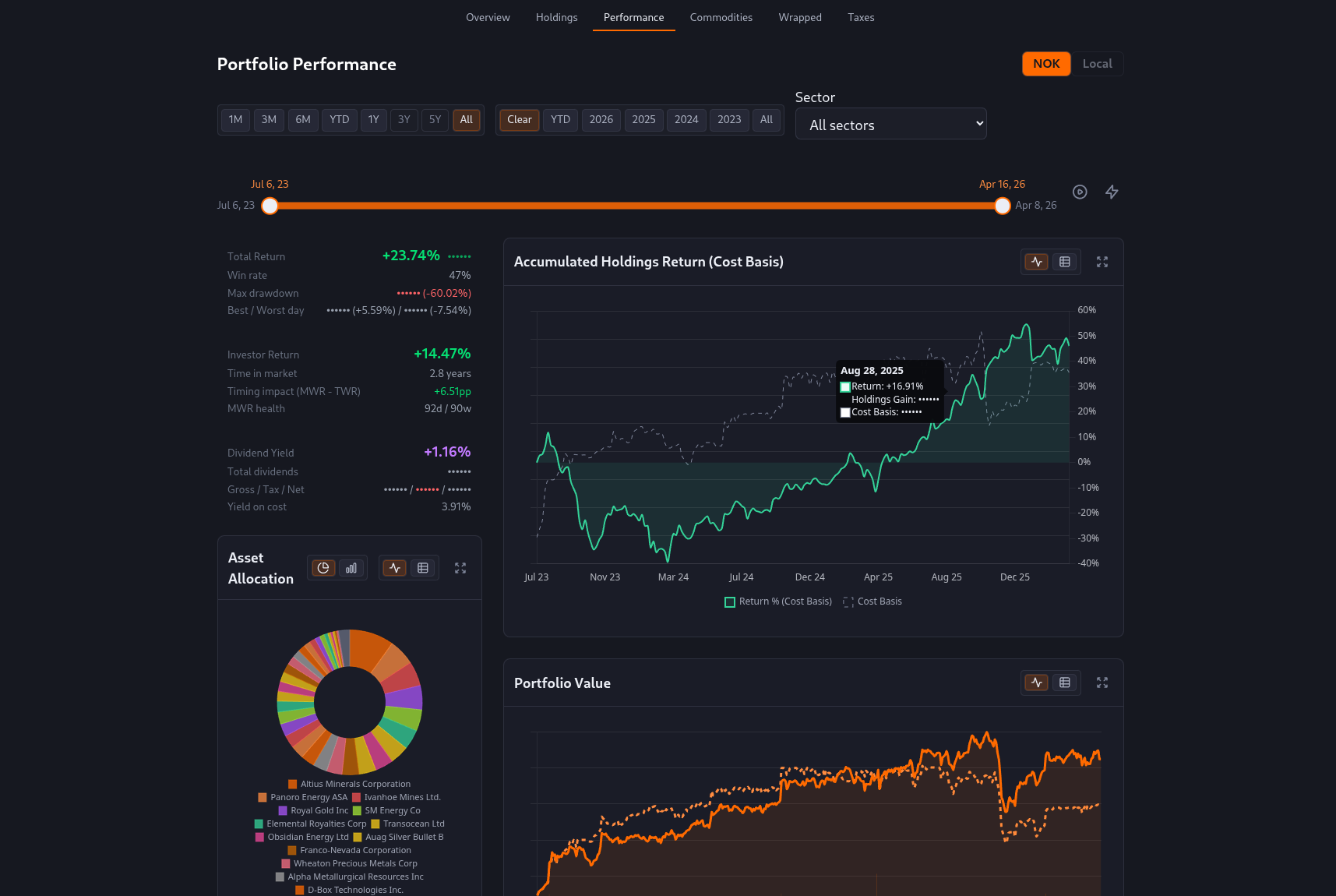
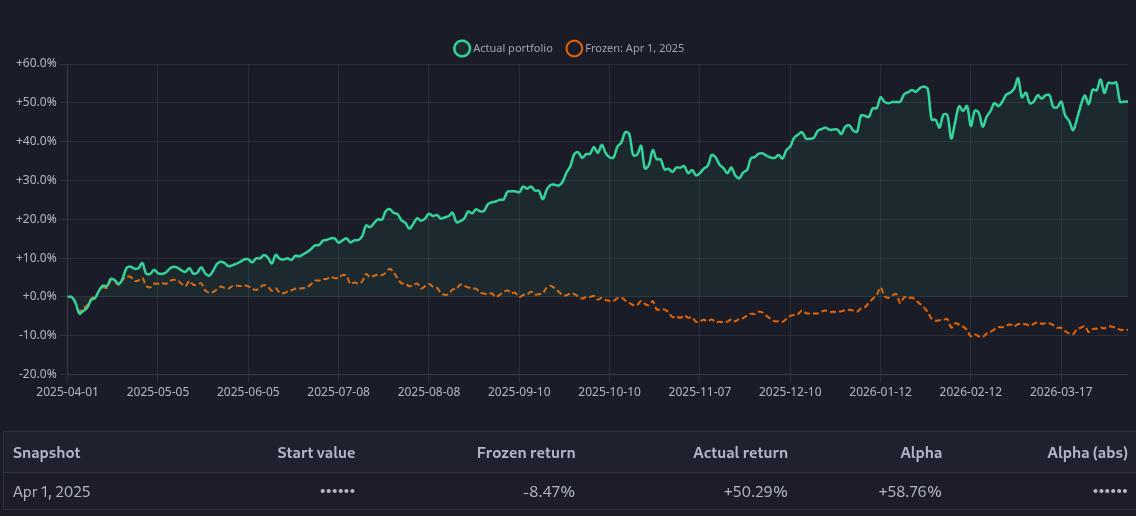
Rolling and calendar periods, sector-wide filters, category returns, and a portfolio benchmark that freezes your past holdings so you can see the alpha from trades after a snapshot date.
The Performance tab combines summary metrics (including timing impact and drawdowns), allocation, and long-horizon return charts. Filter the entire page by sector or scrub a custom date range.
- Presets from one week through all history, plus whole calendar years.
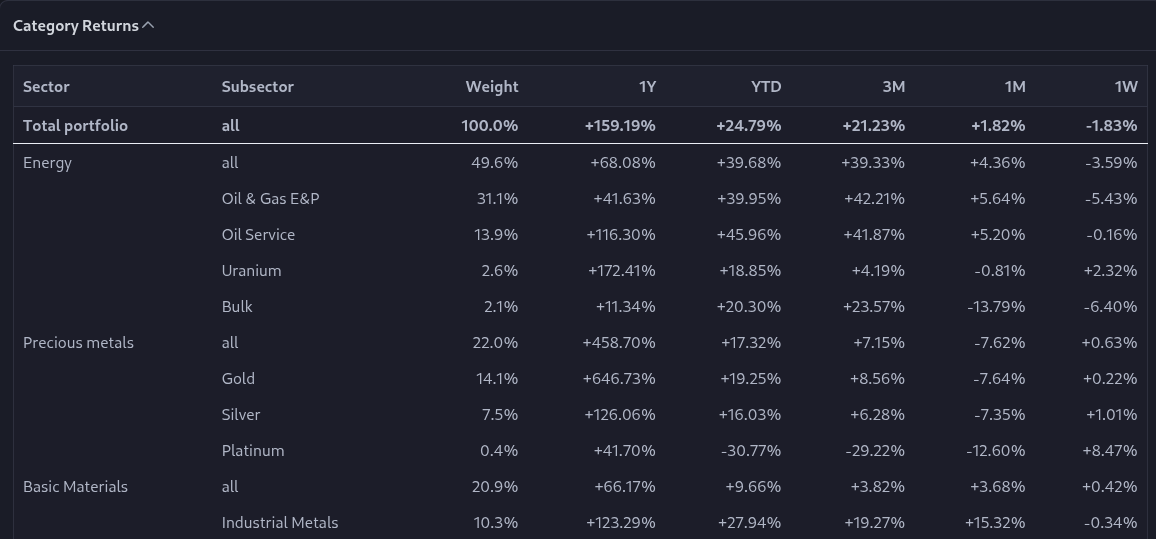
- Category Returns: portfolio, sector, and industry weights with 1W through 1Y columns.
- Per-holding IRR and portfolio-level return views with chart and data modes.
Allocation and portfolio fundamentals
See diversification by currency, country, and sector, model target weights in a local-only sandbox, and roll up ownership-weighted fundamentals across everything you own.
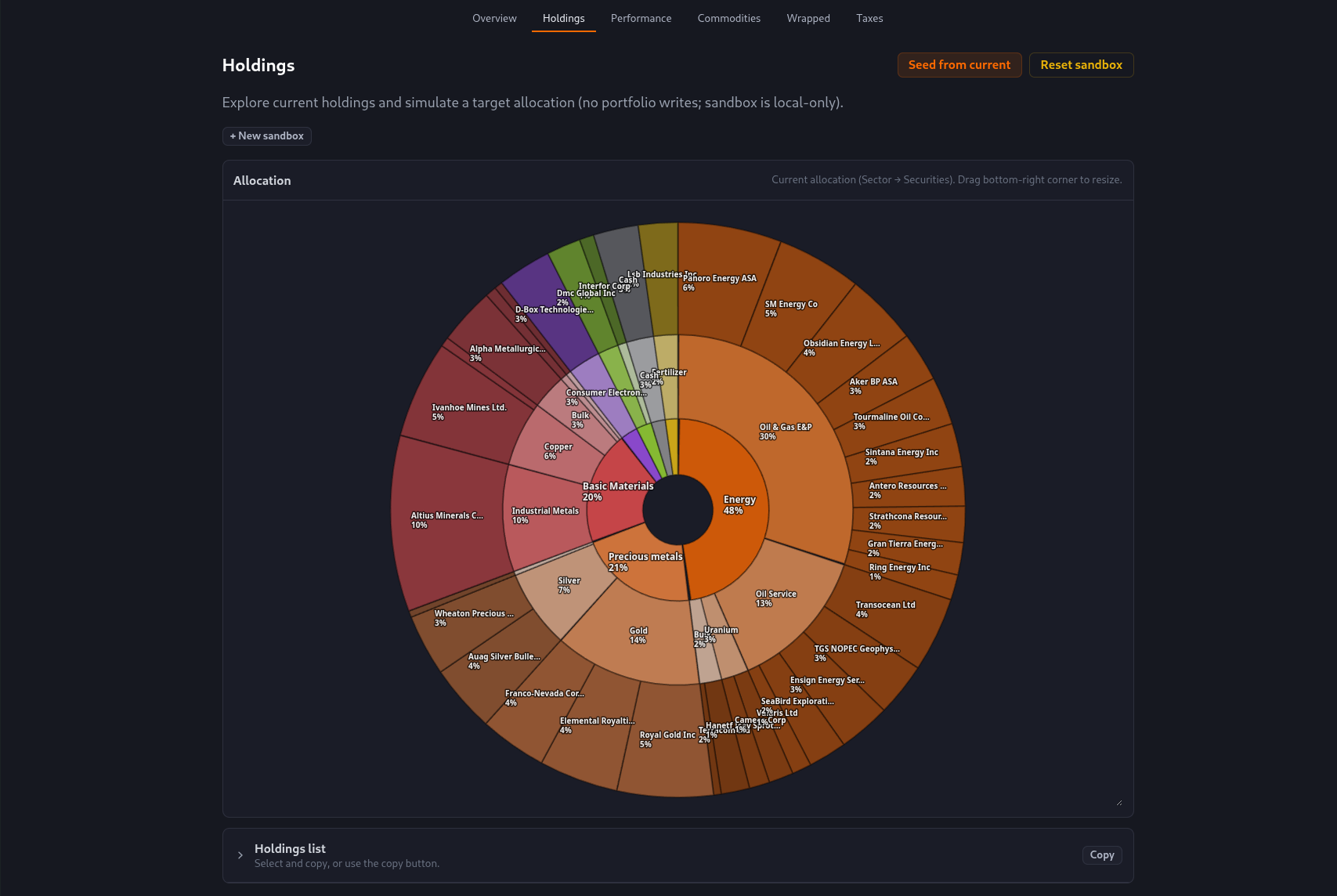
The Holdings sandbox keeps what-if portfolios in local storage only: seed from today, tweak weights, and explore nested sector-to-security allocation visually.
- Sunburst allocation from sector down to individual lines.
- Multiple sandbox tabs per portfolio with optional performance backtest when targets are set.
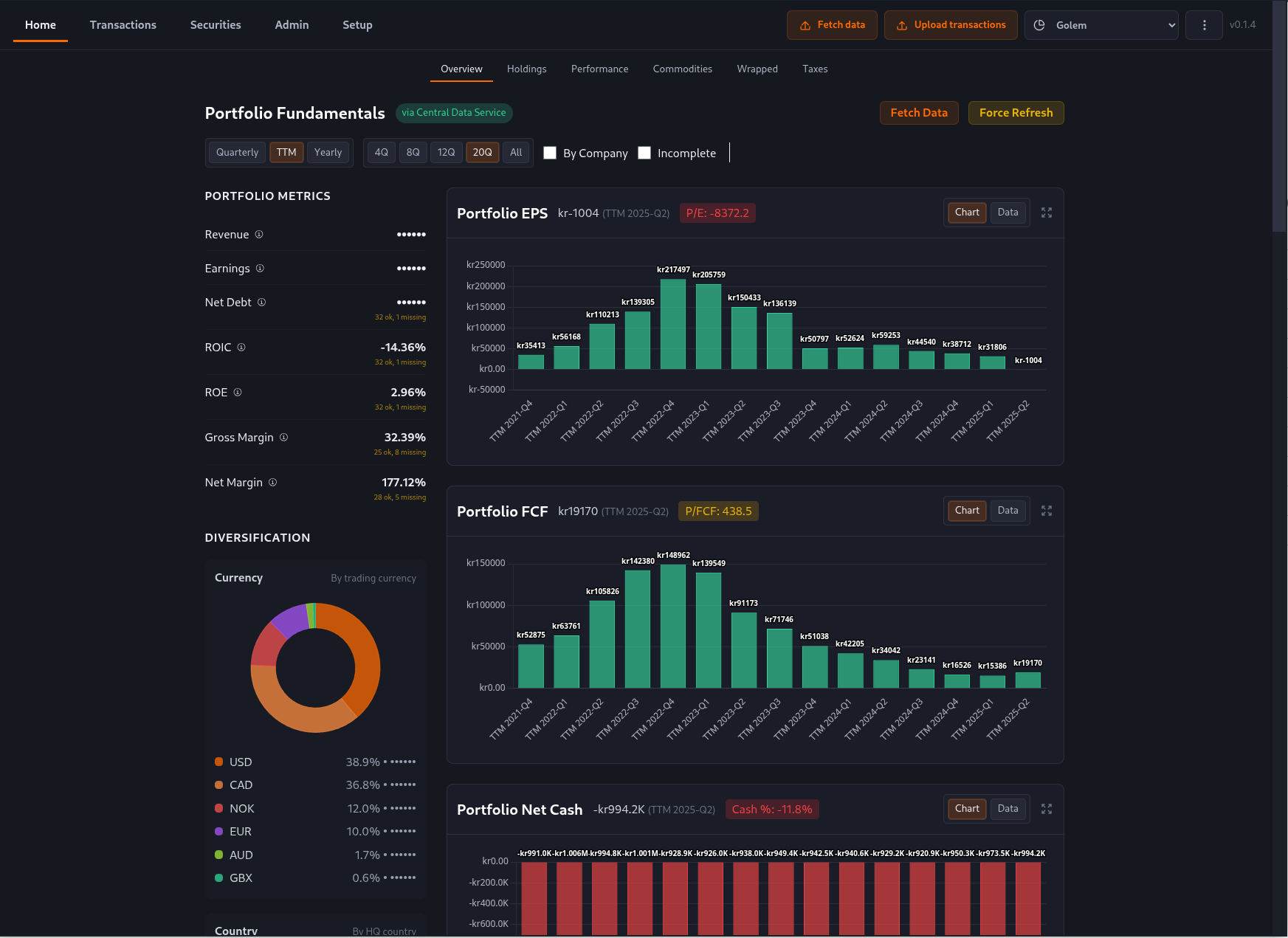
Portfolio Fundamentals aggregates revenue, earnings, cash flow, net debt, ROIC, ROE, and margins using your position sizes. Switch quarterly, TTM, or yearly views and fetch via your own data providers or the optional central data service.
- Bar charts for portfolio EPS, free cash flow, and net cash over time.
- Side-by-side diversification doughnuts (for example trading currency).
Year in Review
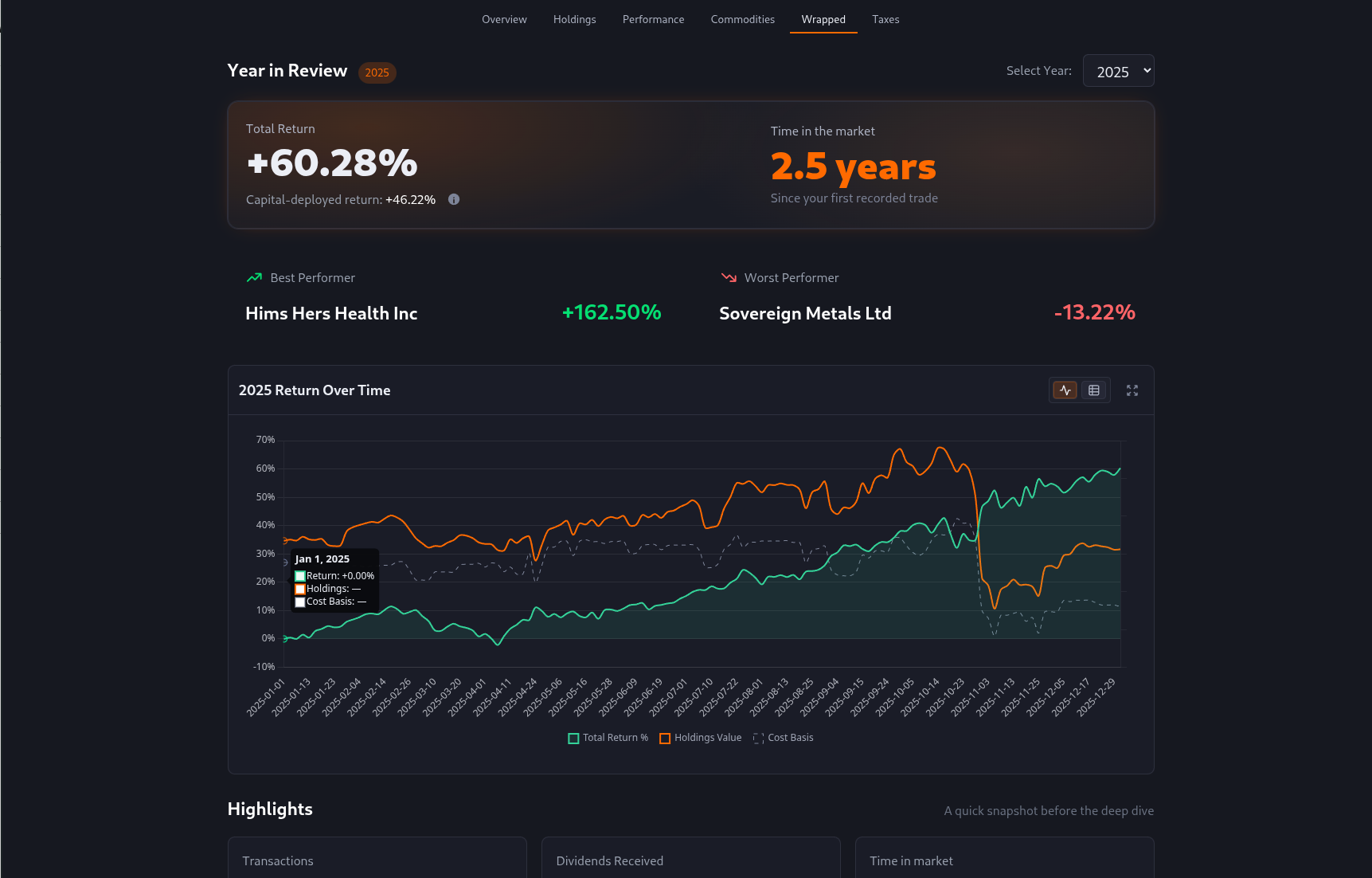
A year-at-a-time story: headline return, best and worst names, trading cadence, drawdowns, and trivia that only appears when your history supports it.
- Pick any calendar year with activity; the current year is capped to year-to-date.
- Return-over-time chart with holdings value and cost basis for context.
- Highlights, trading patterns, and contribution views without leaving the narrative flow.
Investment process
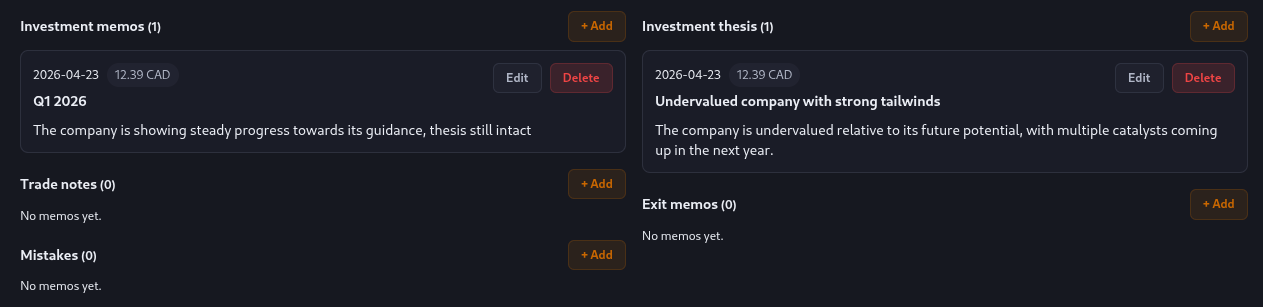
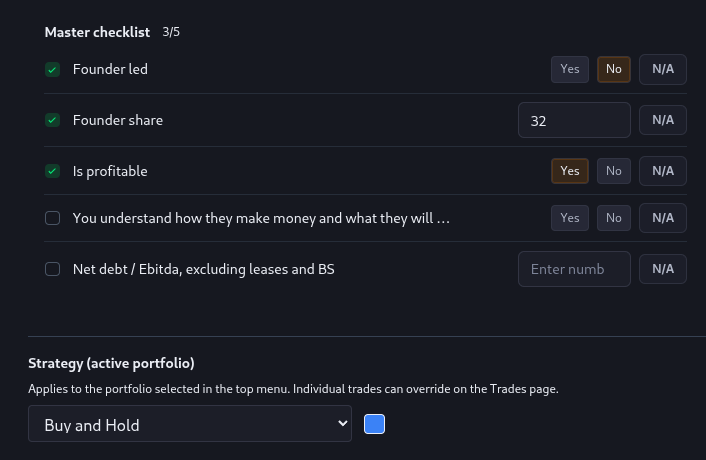
Structured memos, evaluation checklists, and strategy tags keep your investment discipline visible across every holding you own.
- Configurable memo sections — thesis, periodic updates, trade notes, exit memos, mistakes, and custom categories — each attached to a security with date, optional price snapshot, and markdown body.
- Typed checklists (number, yes/no, text) let you define reusable evaluation templates and answer them per security, with completion tracking on the Process grid.
- Named investment strategies with colors, assignable per security and optionally per trade, surfaced on Holdings and Performance pages as allocation and return breakdowns.
- Automatic todo reminders for missing thesis memos, overdue quarterly updates, unanswered checklists, and missing exit memos when a position is fully sold.
Privacy and local-first data
Your portfolios, accounts, and transactions stay in a local SQLite database on your computer. Market data is fetched only when you ask for it (prices, fundamentals, FX). The optional central data service centralizes those fetches; it does not replace local storage.
- Privacy Mode masks currency amounts and sensitive columns so you can demo or screen-share safely.
- No silent uploads of your ledger: imports and edits remain on disk until you trigger a sync.
Norway-ready taxes and accounting
Norwegian account types, FIFO purchase lots and realizations, withholding tax, estimated domestic tax, and Fiken automation for holding-company books. Tax estimates are experimental and are not tax advice.
Tax insight you can act on
Per-year FIFO tables, CSV export, withholding tax on foreign dividends, and breakdowns when you mix VPS, ASK, IKZ, IPS, and other Norwegian account types. Deferred-gain views appear where the rules require them.
- Explicit year selection for tax tables (no hidden defaults).
- Estimated gains tax, dividend tax, credits, and after-tax return context.
- Clearly labelled experimental coverage for Norwegian rules.
Automated Fiken accounting
Record trades, dividends, fees, and related cash movements into Fiken with verification workflows suited to Norwegian securities accounting, including year-by-year reconciliation against journal entries.
- Browser automation and API paths depending on the workflow.
- Status tracking per row plus bulk mark synced or not synced locally.
- Built for holding-company securities registers as well as personal portfolios.
How it works
Import with validation, refine corporate actions and cash events, then explore performance and optional tax and accounting automation.
-
1
Import from your broker
Upload CSV or Excel, map columns, resolve securities, pair corporate actions, then confirm.
-
2
Review and refine
Edit transactions inline, reconcile broker syncs, and keep cash ledgers aligned per account.
-
3
Explore and automate
Use Performance, Wrapped, and fundamentals views locally, then layer Norwegian tax estimates and Fiken posting when you need them.
Download Myntbase
Free while in alpha. Pick your platform — the app will sign you up on first launch and keep itself up to date after that.
All releases are published at github.com/fumbleforce/myntbase-releases. The app auto-updates from the same place, so future versions arrive without another download.